Student Accessibility + Support
Our learning community thrives when all students are able to do their best. ECU offers support for students with a variety of needs.
In this section, find out what services are available to you and your students and how to access them.

Accessibility + Accommodations
Students with disabilities or learning differences must be supported in the design and delivery of courses and assignments. ECU has an ethical and legal duty to accommodate, ensuring equal access to all programs, services and facilities.
Support at ECU
Student Accessibility Services, part of Student Services, provides accommodations, resources and supports. Accommodations are changes to the learning environment that reduce barriers and create equal opportunities.
How Accommodations Work
Each student’s accommodations are:
- Tailored to their individual needs
- Based on documentation from a licensed practitioner
- Outlined in an Accommodation Notice (issued each semester) that students submit to faculty and technicians
Conditions Supported
Student Accessibility Services supports a wide range of ongoing, episodic, apparent and non-evident conditions, including:
- Physical disabilities such as visual impairment, hearing loss or mobility challenges
- Mental health conditions such as depression, anxiety or bipolar disorder
- Chronic health conditions such as arthritis, chronic pain, Crohn’s disease or migraines
- Neurological conditions such as acquired brain injury, ADHD, autism spectrum disorder or learning disabilities
About Accommodation Notices
Students who require an accommodation to the learning environment will be given an Accommodation Notice from Student Accessibility Services. This notice outlines the alterations to the learning environment that are required but, in order to protect the student’s privacy, does not identify the student’s medical condition. It does, however, contain other personal and sensitive student information that should not be shared with other students, the public or anyone outside of a teaching capacity for your course.
If a student wishes to request accommodations, they will email you a copy of their Accommodation Notice to introduce themselves and begin a conversation about the accommodations that will support their learning experience and how these can be realized in the course.
The Accommodation Notice is sent to the student through TitanFile. Students are asked to cc Student Accessibility Services on the introductory email to you. This will inform the Student Accessibility Services team of who they may speak to regarding the student’s specific accommodations should any questions arise. Further communications between yourself and the student do not have to be copied to Accessibility Services.
When presented with an Accommodation Notice, it is important that you have a discussion with the student about how the accommodation will be implemented in the context of your course delivery, expectations, learning outcomes and evaluation.
Students may have some apprehension or discomfort in talking about their Accommodation Notice with you. Discussions with students about accommodations should be conducted discreetly, according them the same respect as a colleague with a medical condition.
Accessibility + Accommodations FAQs
Should I provide accommodation upon request even if a student hasn’t provided an accommodation notice?
You are not expected or obligated to provide accommodation if a student has not provided an Accommodation Notice. In fact, doing so could constitute giving an unfair advantage.
Student Accessibility Services is the only office designated to review documentation of a disability and determine eligibility for academic accommodations. Students have the right to choose not to use accommodations. If a student asks retroactively for an accommodation, you are not under any obligation to comply.
What should I do if I have a student with a disability in jeopardy of not being able to pass the course?
Students with disabilities are not exempt from the university policies and curriculum. It is important use the Support Messaging system to promote their success.
Do I have a right to fail a student with a disability?
Students with disabilities have the same right to fail as anyone else. Their work should be evaluated equivalent to their peers. It is advised that you discuss your observations with this student just as you would with any other student in your course who is experiencing difficulty.
Who do I contact if I have questions or concerns about requested accommodations?
Contact Student Accessibility Services to discuss your concerns. Student Accessibility Services provides support to instructors as well as students.
Communicating Concerns: the Support Messaging System
If you’re concerned about a student’s academic progress or emotional well-being, use the Support Messaging System to share your concerns directly with them.
For questions about how the system works, email src-support@ecuad.ca. The system is managed by the Student Resource Coordinator in Counselling + Wellness.
About the Support Messaging System
The Support Messaging System is an electronic messaging system for faculty and administration to communicate to students about academic or behavioural concerns.
The purpose of a Support Message is to draw attention to your concern, make suggestions for improvement and/or direct students to university resources that may help them.
It is appropriate to send a Support Message if students are not meeting their course requirements and are in danger of failing the class, have committed academic concerns and/or are exhibiting emotional distress.
Please address your Support Message to the student, as they are the main recipient. The sender and the Student Resource Coordinator also receive a notification that the message was sent.
How to Send a Support Message
To send a support message for a student, you will need to first log in to MYEC.
On the vertical menu to the left you will see a section titled Daily Work.
Click to open the dropdown, click Support Messages and select “Create a Support Message”
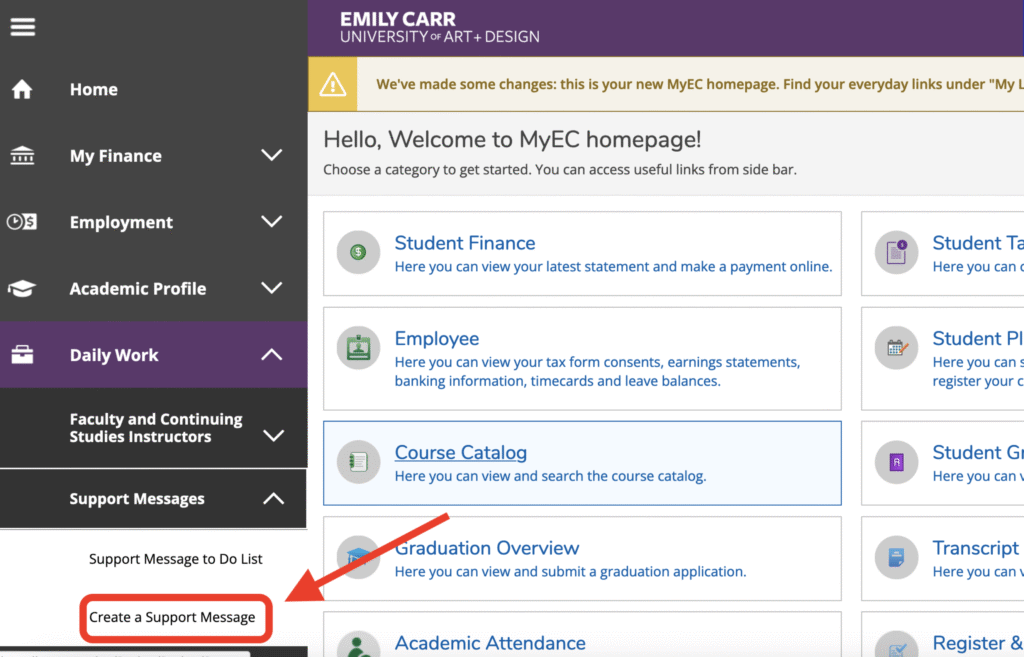
Enter the student’s name or student number and hit enter.
Complete the form, selecting either Academic Check-in (for attendance, progress or quality of work concerns) or Referral for Support (for concerns about a student’s behaviour or emotional wellbeing). There are instructions on the form page.
Types of Support Messages
There are two types of Support Messages: Referral for Support and Academic Check-in.
Referral for Support Messages
These should include information about the behaviours of concern and suggested support services. Distressed behaviours may include:
- Changes in mood, energy or personal hygiene and appearance.
- Crying or unusual irritability.
- A withdrawal from usual activities.
- Depressed, anxious or agitated behaviour.
Academic Check-in Messages
These should include information regarding academic concerns and suggestions for improvement. Academic concerns may include:
- A lack of essential skills or competencies.
- Late or missing assignments or marked changes in quality of work.
- A pattern of ongoing requests for concessions.
- An inconsistent or lack of attendance or participation.
- Academic misconduct, like plagiarism.
The Student Resource Coordinator (SRC) reviews all Support Messages to ensure that students are connected to the university resources that may be of assistance to them. The SRC will reach out to the student if they have received one Referral for Support message or two Academic Check-in messages.
The Support Message goes to the student. The sender and the Student Resource Coordinator also receive notification that the message was sent.
Writing a Support Message
Below are examples and templates to help you write Referral for Support and Academic Check-in messages.
Referral for Support with Distressing Behaviour message
Template
Hi Student,
When you ….. (what happened, concrete, observable language), I noticed that …. (behaviour of concern), I became concerned about ….. (expression of concern). I would like you to connect with our Student Resource Coordinator, who is available to help you find supports you may need at this time (connect student to support).
Example
Hi Dan,
When you shared with me that you hadn’t slept for a few days because of personal reasons (what happened, concrete, observable language) and that you had an anger outburst in your class (behaviour of concern), I became concerned about your well-being (expression of concern). I would like you to connect with our Student Resource Coordinator, who is available to help you find supports you may need at this time.(connect student to support)
Academic Check-in Message
Examples: Academic Check-in
Hi Miho,
You have missed the last two classes without notifying me. If you are going to be absent, please let me know. Please review the attendance policy for ECU as three missed classes without notification may result in an F for this course.
Hello Lisa,
As per our conversation after your presentation today, please prepare and submit the additional references that you used in the presentation by Friday, March 3. Failure to do so will result in a 10% deduction from your grade.
Examples: Academic Misconduct
Dear Marcello,
Thank you for meeting with me today to discuss your first assignment. As we discussed, there were several passages in your paper that were copied directly from Wikipedia without citations. I understand that you were confused about the assignment instructions, so I have allowed you to resubmit the assignment with a 10% grade penalty. Please consider visiting the Writing Centre for support in learning citation practices. And please review the ECU Academic Integrity policy as a second mistake of this kind will result in a more serious punishment, including failure of the assignment or course.
Hello Jason,
I am sorry you were unable to attend our meeting this afternoon to discuss your final assignment. As I mentioned in my email, I was very concerned to see you submitting work that was clearly created for another class. This is a serious breach of ECU’s Academic Integrity policy, which is why I am giving you a zero on this assignment. If you feel that this assessment is in error, please contact me at your earliest convenience to reschedule our discussion. Otherwise, please be aware that any future academic misconduct may jeopardize your ability to continue in your program or at ECU.